

English
Adding/Editing a Supplier Group
It is possible to create a supplier group that you can select when preparing batch payments instead of individually selecting each of the desired suppliers. For example, this group could be consisting of all suppliers that are payable on the 15th of the month and be called "15th of the month".
Adding a Supplier Group
From Main menu >> Accounts Payable >> List of Supplier Groups.
Click on Actions >> New Supplier Group.
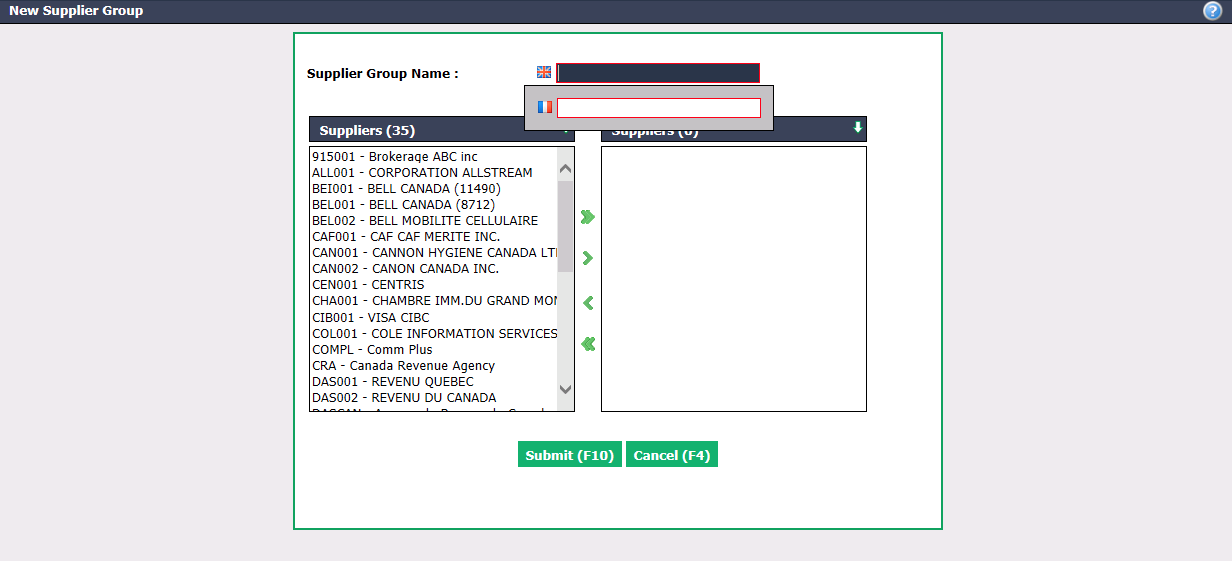
Enter the Supplier Group Name in English as well as in French.
Select the desired Suppliers using the green arrows. The double arrow allows you to select all suppliers with one click, while the single arrow selects only one at a time.
You can double-click on a supplier to select it instead of using the green arrow.
- Click on Submit and the supplier group will be added in the system.
Editing a Supplier Group
To modify an existing supplier group, select it from the List of Supplier Groups.
Make the desired changes and click on Submit to save them.