

English
FAQ - Frequently Asked Questions eZmax version 4
FAQ - Frequently Asked Questions eZmax version 4
Why weren’t we informed earlier?
We launched a communication campaign a little over a year ago to inform our clients about the migration to eZmax version 4+, aiming to ensure a smooth transition. If you didn’t receive this information, we encourage you to subscribe to our client communications to stay updated with the latest eZmax news and updates. We also regularly share updates via our social media channels, including LinkedIn, Instagram, and Facebook.
Why do I have to change?
We understand that change can be uncomfortable. We all have habits and ways of working that we are familiar with. However, technology evolves rapidly, and eZmax needs to keep pace to offer you the best possible features. The technology underlying the old version can no longer meet current market needs. Updating is essential for us to continue improving our product and providing you with a more effective and tailored experience.
Can I keep the old version if I don't like the new one?
We strongly recommend downloading version 4+ now to familiarize yourself with the improved platform. This way, you can avoid a forced transition at a potentially inconvenient time. Our advisors are available to answer all your questions. Additionally, using the latest version will offer you advantages that will simplify your work and save you time.
Click here to join a webinar that will provide you with more details on this topic.
**Why is there a new version - the old one works. **
The new version is designed to be more agile and provide smoother navigation with advanced features that the old version cannot support. It has been developed with future features and interfaces in mind, which we will be rolling out over the coming months and years, to provide you with an enhanced user experience and optimize your operations.
How long do I have before the old version stops working? I’d like to wait until the last minute to switch.
We strongly advise against waiting until the last minute to make the switch. When the change becomes mandatory, our support team will likely be busy with a high volume of requests. By updating now, you can manage the transition at your own pace. The benefits of the new version far outweigh any temporary discomfort associated with adapting to the change.
I find the new method for adding files to the EDM too complicated.
The new interface for document management actually offers more flexibility and options for handling documents. Once you get used to it, you will find that document manipulation is very efficient. We encourage you to check out our tutorials to help you familiarize yourself with these new features.
Why is it no longer possible to scan documents directly into the app?
Due to advanced security measures, newer operating systems (such as macOS or Windows) prevent external applications (like eZmax) from communicating directly with external devices connected to the computer. As a result, eZmax cannot "communicate" with either the scanner or the printer. Therefore, you need to scan your documents on your computer first and then upload them into the document management system.
To familiarize yourself with the new procedures for adding documents to the document management system and eZsign, we encourage you to consult our tutorials.
Why is it no longer possible to configure the print trays?
Due to enhanced security measures in recent operating systems (such as macOS and Windows), external applications like eZmax can no longer communicate directly with the computer's external devices.
To work around this limitation, we recommend creating a second virtual printer in Windows. This virtual printer will act as a "relay" to the desired print tray. When printing, you will need to manually select this virtual printer, which will then direct to the correct print tray. Automation of this selection is no longer possible.
What should I do if I forget my password?
Click on "Problem" and follow the instructions to reset your password. You will also need to update your password on all your devices. This is a good opportunity to enhance your cybersecurity by ensuring you have the latest version of the app on all your devices.
Why does my admin need to reauthorize my computer?
Some agencies require device authorization for accessing eZmax as an additional security measure. Anyone logging in again with the version 4+ app will need to be reauthorized by their admin if their agency mandates it.
Don't recognize the icon in the menu?
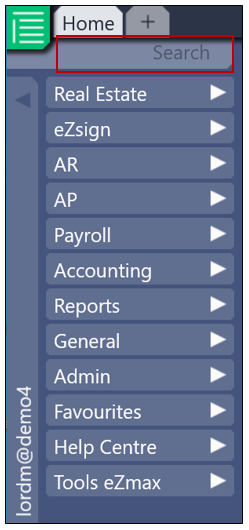
To identify an icon, perform a long press (on iOS) or a right-click (on Windows) on the item. However, we recommend using the quick search feature in the menu, which is very efficient for navigating the version 4+.
Why can't I automatically open the document in Adobe?
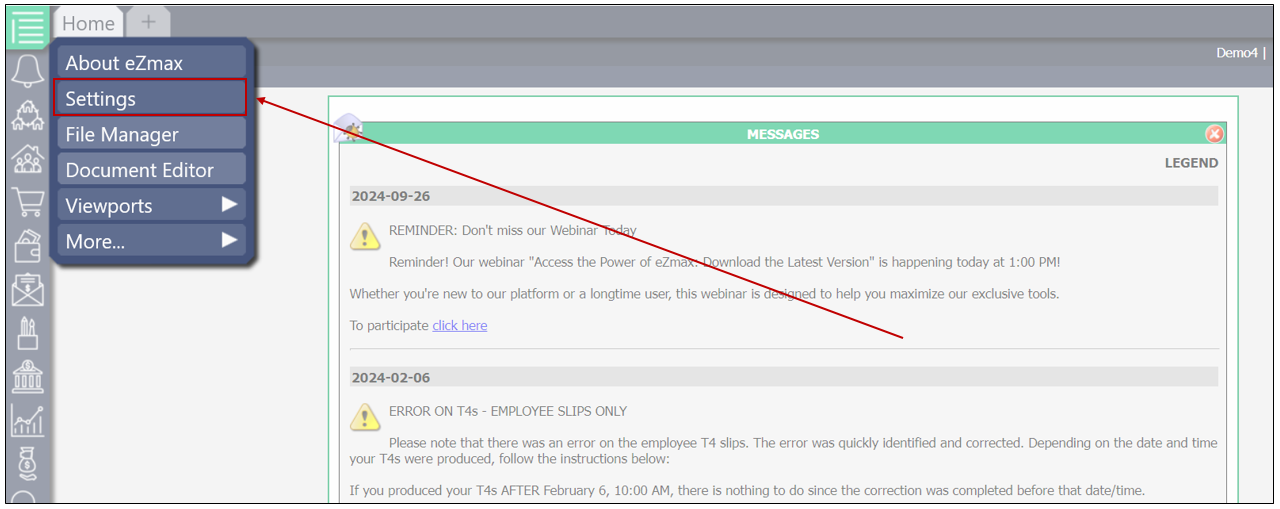
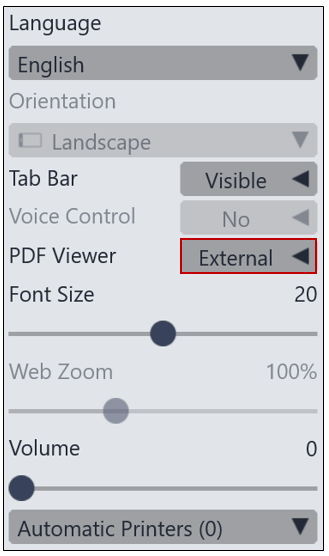
To open a document in Adobe, you need to long press the menu (on iOS) or right-click (on Windows). Then select "Settings" and set "External" to "PDF Reader."
The microphone is on by default when I open the app. How can I change that?
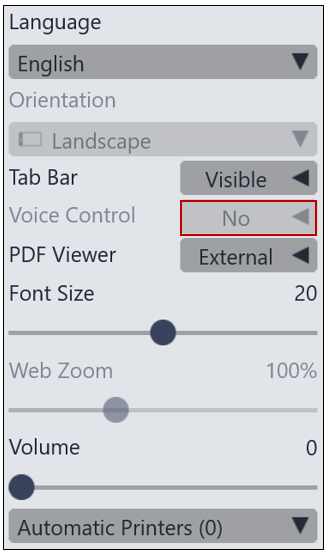
You will need to access the settings by long pressing the menu (on iOS) or right-clicking (on Windows). You will then have the option to disable voice control by setting it to "No." We also recommend turning the volume down to 0.
How can I move the tabs?
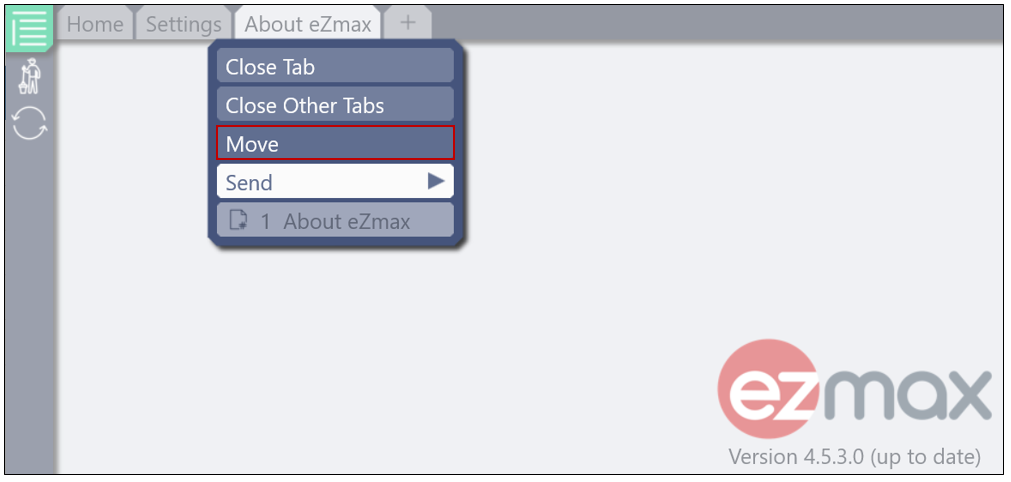
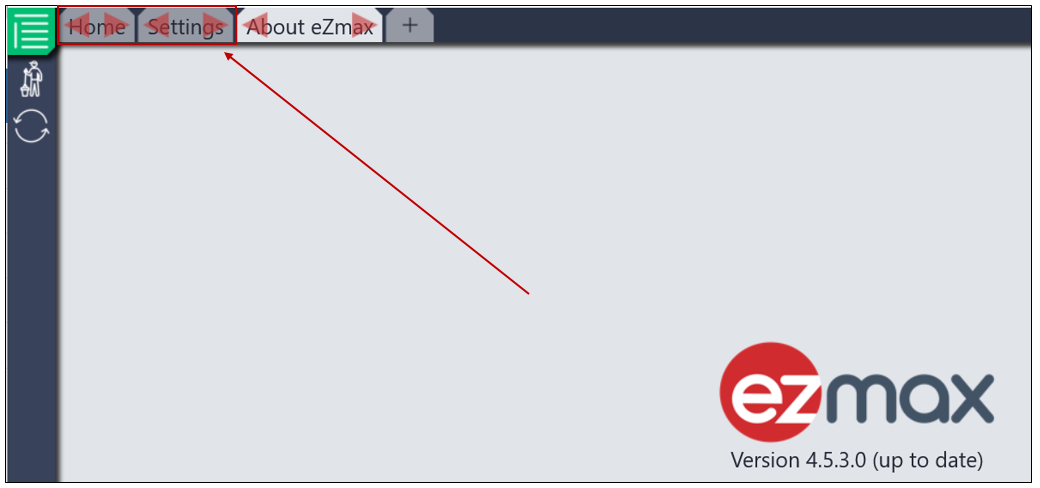
A new feature allows you to easily move a tab. To do this, long press (on iOS) or right-click (on Windows) on the desired tab. Then select "Move." You will then be able to rearrange it using the red arrows of another tab.
How can I find out which version of the app I am on?
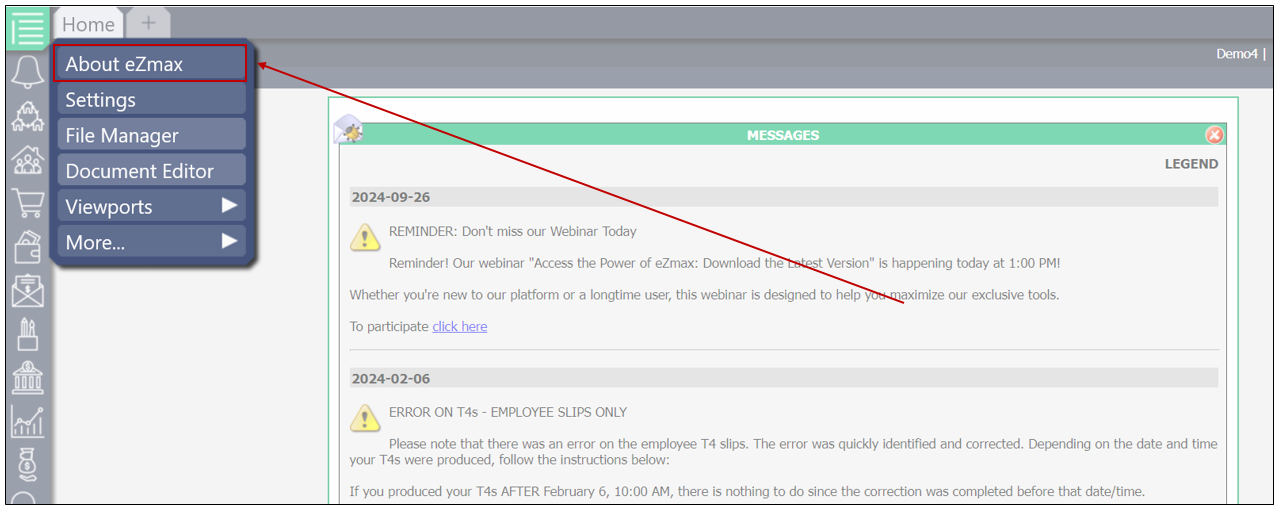
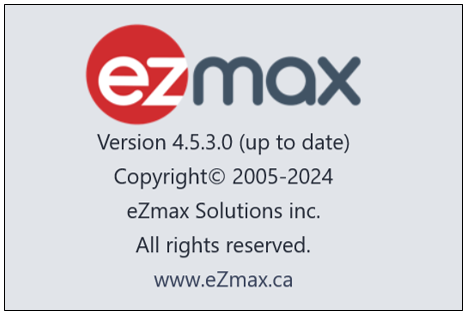
To find out which version of the app you are using, long press the menu (on iOS) or right-click (on Windows). Then select "About eZmax." You will be able to see the version of eZmax you are using.
I just downloaded version 4+, but I can't find the app.
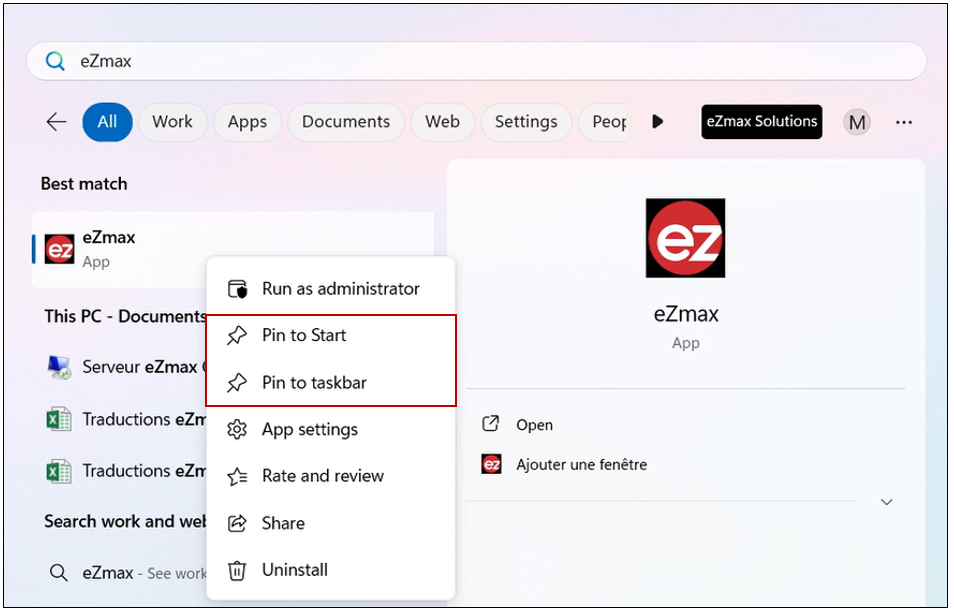
Once the app is downloaded, you can add the eZmax icon to your task bar for quicker access.
Here’s how to do it on Windows:
You will need to search and type "eZmax." Then right-click on the eZmax icon and select either "Pin to Start" or "Pin to Taskbar."
Here’s how to do it on MAC:
eZmax will be available in your applications. Once the app is open, right-click on the eZmax icon and select the option "Keep in Dock."