

English
Send the report to RE/MAX LLC
- Send the report to RE/MAX Max Center
Warning
- The report must be submitted before the 10th of the month.
- At the end of each month, eZmax should match with Max Center. Please note that if any errors were made and only noticed/corrected after the data has been submitted, the corrections will appear in the following month’s report.
From the homepage, click the Send button on the “Reports Not Sent to RE/MAX LLC since XXX Days”.
NOTE : If you still see a message on your home page after submitting the report, it means that you didn’t have a completely successful sending. You can contact eZmax to find out the cause of the error.

If this message is not appearing on the homepage, go to Real Estate >> Franchise Reporting – RE/MAX LLC
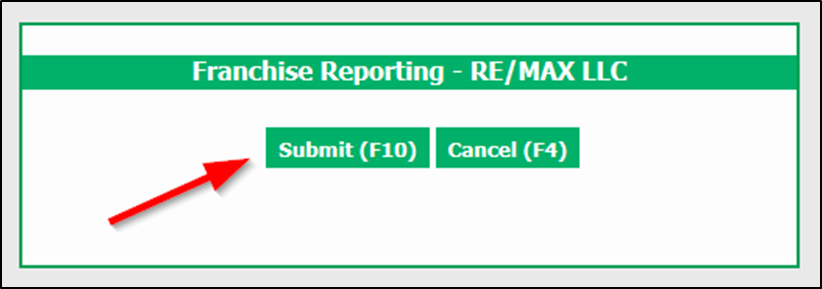
NOTE : Once you clicked on submit, the transmission will take place in the background. The Submit button will ’’grey out’’ once it is clicked. Process to transmit typically takes 5-15minutes.
Warning
Do not click Submit button more than once, if you do, duplicates will be send to RE/MAX Max Center.
Once it has finished processing , the system might display the number of transactions sent or any special notices in regards to why something was not sent. You can right click and print these if necessary for review.
After sending your report to RE/MAX, you can view transmitted information.
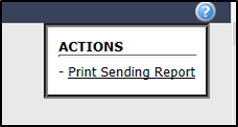
Real Estate >> Franchise Reporting – RE/MAX LLC >> Action >> Print Sending Report >> Enter Transmission Date in From and To >> Submit
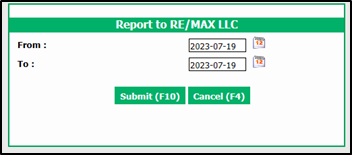
NOTE : Data cannot be viewed prior to transmission
List of fields requested by/transmitted to RE/MAX, LLC
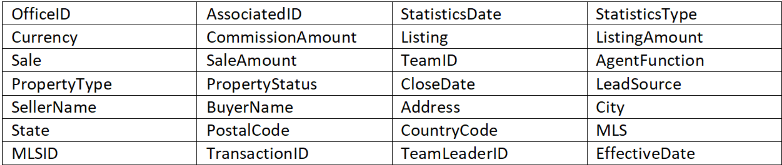
Validating DATA between eZMax and Max Center
Validation Commission amount
In eZmax, Go to Reports >> Office reports >> Commission reports >> Commission report (Summary/Global)
- Referral Date : Calculation date
- From : Week or Month of the transmission only
- Report Type : Summary
- Income Type : All
- By department if Office separate IDs if not separate ID’s not by department
In RE/MAX Max Center, go to Affiliate MTD View >> Change Statistics Period From : Month of transmission (Same month has eZmax)
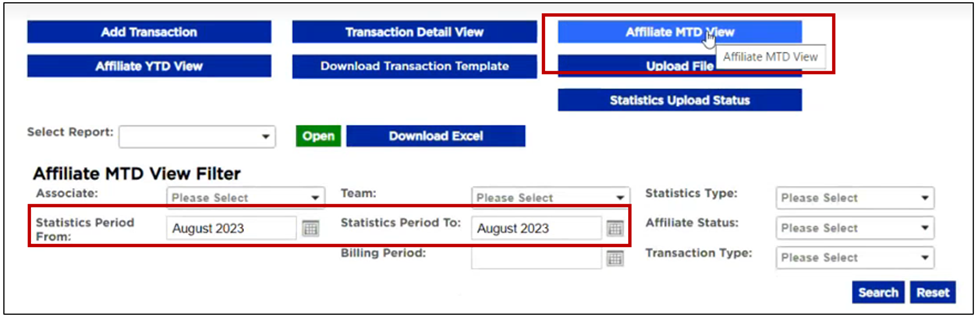
The eZmax commission report should match the commission column in RE/MAX Max center.


Warning
If there is a difference in the eZmax commission report and the commission column in RE/MAX Max Center it’s possible that it is because of the other income transactions.
NOTE : We only send automatically Real Estate Referral type of other income, you are not suppose to send your property management transactions.
- Validating number of Ends
In eZMax, Go to Reports >> Office reports >> Transaction volume and ends ranking report
From, To : Month date
Detailed or Summary
Transaction Type : Closed deals
Type : All
Department : By department if Office separate IDs if not separate ID’s not by department
Date : Modification or Calculation
Sort by : Name, Increasing
Deal type : Residential (print the report) Commercial (print the report). If you don’t do commercial transaction select ALL
Select all agents
Finalize your monthly stat in REMAX Max Center
In RE/MAX Max Center, Go to $Billing/Payment >> Preview/Finalize Monthly Billing >> Finalize Office Bill
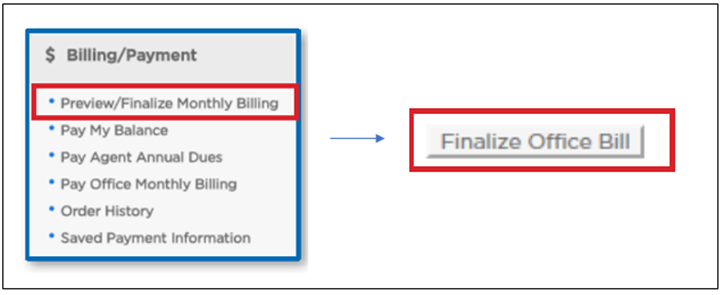
- Year End with RE/MAX LLC and eZmax
Warning
The report must be submitted before January 10th.
There are 2 important reports for YE.
Commission Report
In eZmax, Go to Reports >> Office reports >> Commission reports >> Commission report (Summary/Global)
- Referral Date : Calculation date
- From : Current year
- Report Type : Summary
- Income Type : All
- By department if Office separate IDs if not separate ID’s not by department
Transaction Volume and Ends Ranking Report
In eZMax, Go to Reports >> Office reports >> Transaction volume and ends ranking report
- From, To : Month date
- Detailed or Summary
- Transaction Type : Closed deals
- Type : All
- Department : By department if Office separate IDs if not separate ID’s not by department
- Date : Modification or Calculation
- Sort by : Name, Increasing
- Deal type : Residential (print the report) Commercial (print the report). If you don’t do commercial transaction select ALL
- Select all agents