

English
Authorizations of an Admin User - Accounts Receivable
From an Admin user’s profile, it is possible to manage his authorizations. There are 11 tabs that group together the different types of authorizations. In this article, you will see what each of the authorizations of the "Accounts Receivable" tab allows you to do when "All" is selected.
Accounts Receivable
From Main menu >> Admin. >> List of Users, click on "Admin" and select the desired user.
Click on Actions >> Manage Authorizations.
Click on the "Account Receivable" tab.
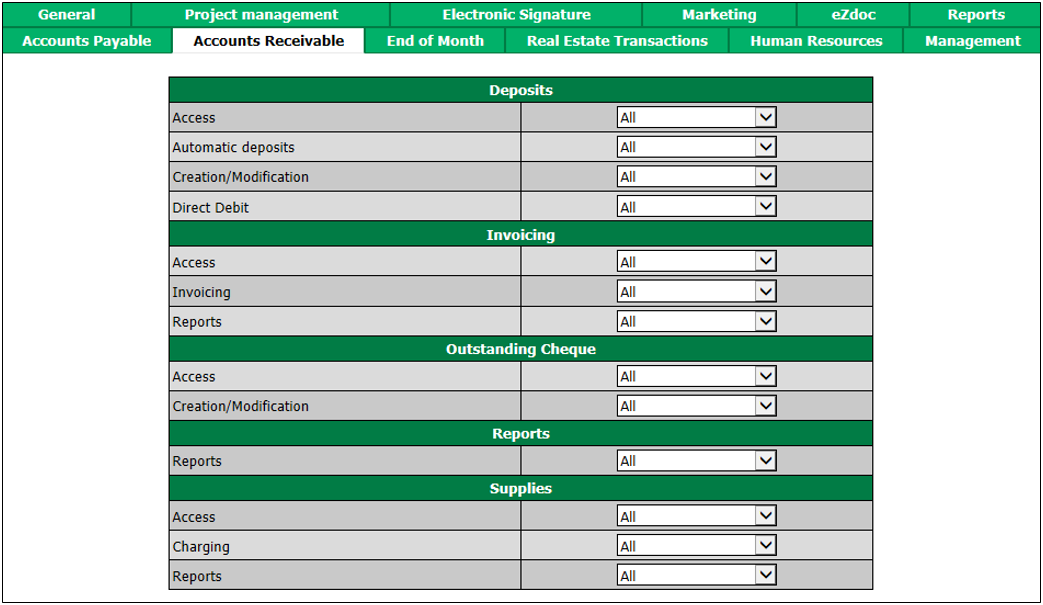
"Deposits" section
Access : The user will be able to view the list of deposits.
Automatic deposits : The user will be able to add and edit automatic deposits.
Creation/Modification : The user will be able to view, add, edit and delete deposits.
Direct Debit : The user will be able to make direct debits.
"Invoicing" section
Access : The user will be able to view the list of invoices and the account statements.
Invoicing : The user will be able to view, add, edit and reverse invoices.
Reports : The user will be able to produce an invoicing report.
"Outstanding Cheque" section
Access : The user will be able to view the list of cheques receivable.
Creation/Modification : The user will be able to view, add, edit and delete outstanding cheques.
"Reports" section
- Reports : The user will be able to produce an accounts receivable report and a deposit report.
"Supplies" section
Access : The user will be able to view the list of supplies.
Charging : The user will be able to view, add, edit and reverse supplies.
Reports : The user will be able to produce a supply sales report.